

Most enterprise EHR migrations don’t fail outright. The cutover happens on schedule, the vendor marks the project complete, and the week-one dashboards look fine. The problems tend to show up afterward. A nurse notices an allergy alert that should have fired and didn’t. The billing team watches claim rejections climb without an obvious cause. A reference lab calls to ask why results stopped coming through a few days ago. A compliance officer requests an access log from before the migration and learns it was never brought over.
By the time any of that surfaces, the project team has usually moved on, and the budget is closed. So the organization absorbs the cost, in clinician hours and rework and occasionally regulatory exposure, for decisions that were made many months earlier and looked reasonable when they were made.
That is worth sitting with for a second, because it explains why these mistakes are so hard to catch. They don’t look like mistakes at the time. They look like sensible scoping calls, or practical ways to save a few weeks, or complexity that someone reasonably decided to handle later. The eight below are the ones that come up most often in migrations that ran into trouble. If you’re scoping a project now, the point is to recognize each one early, while it’s still cheap to deal with.
The full framework these sit inside is covered in EHR Data Migration: The Enterprise Guide, and the EHR Data Migration Checklist is built to catch most of them during planning.
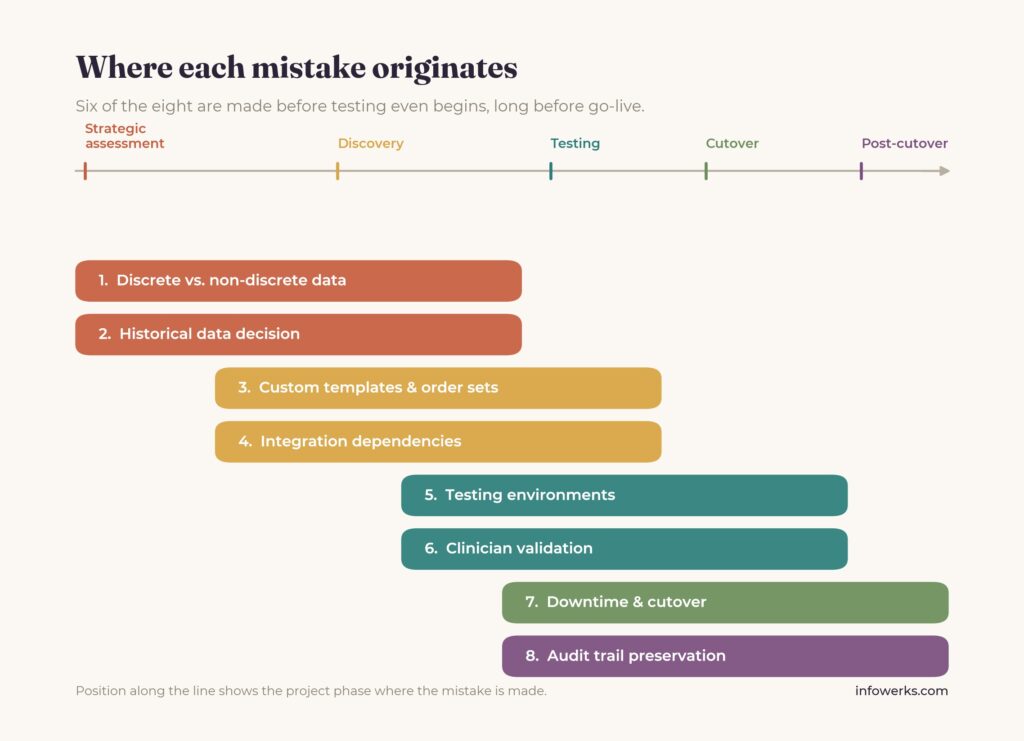
Key Takeaways: The Eight EHR Data Migration Mistakes
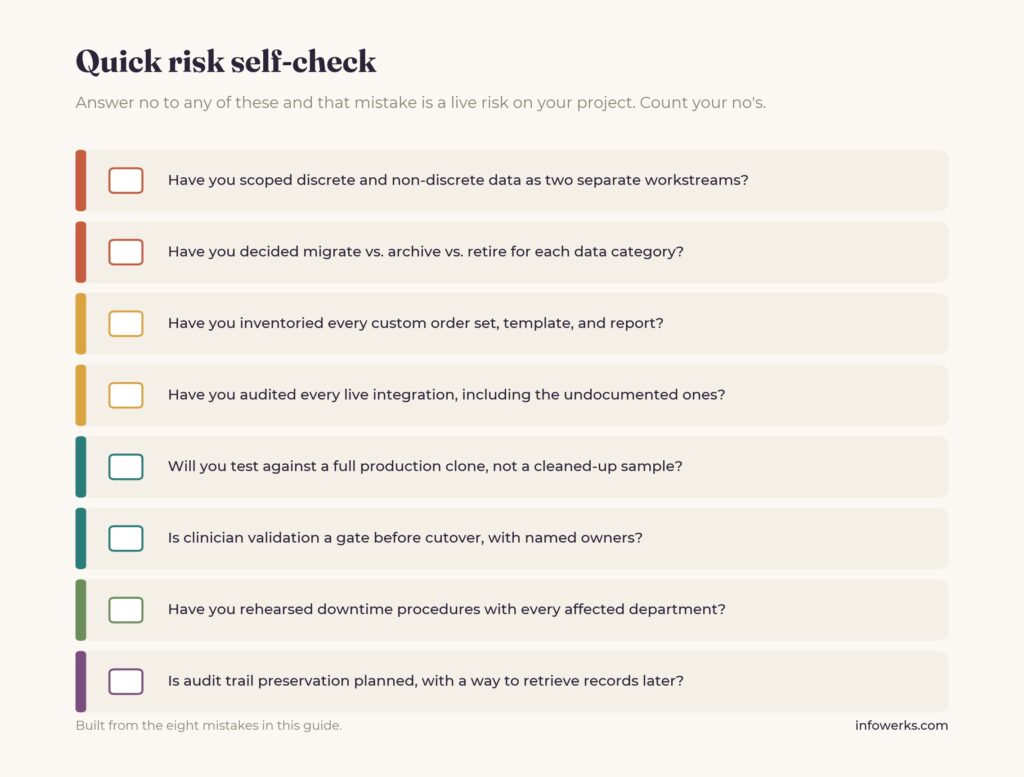
- Underestimating discrete vs. non-discrete data: Treating structured records and unstructured clinical narrative as one migration job, then discovering mid-project that the unstructured portion needs separate handling.
- Deferring the historical data decision: Leaving the migrate-archive-retire choice until after the budget is locked, which forces an expensive retrofit and can mean paying for two systems at once.
- Treating custom templates and order sets as an afterthought: Assuming the new platform’s built-in features will absorb years of accumulated order sets, smart phrases, and decision support, then watching clinician workflows break on day one.
- Overlooking integration dependencies: Scoping interface work from incomplete documentation and discovering undocumented lab, imaging, e-prescribing, or HIE feeds only when they break at cutover.
- Skimping on testing and validation environments: Testing against small, cleaned-up data sets that hide the edge cases, which then surface as go-live tickets when production data runs through.
- Skipping or compressing clinician workflow validation: Confirming data is present without confirming clinicians can actually work, so workflows that passed a demo fail against real patient data.
- Underplanning downtime and cutover coordination: Managing the cutover window as a project task rather than an operations problem, leaving departments without rehearsed manual procedures.
- Missing audit trail preservation: Deferring the migration of source-system access logs until a later audit, payer dispute, or litigation hold requests records that span the migration and finds a gap.
Underestimating Discrete vs. Non-Discrete Data
Some of your clinical data is discrete. Lab values, vitals, coded problem list entries, structured medication records. It lives in defined database fields, and it moves to a new system without much drama. The rest is non-discrete: dictated notes, scanned PDFs, free-text narrative, all the clinical context that accumulated over the years without ever being structured. That data is much harder to move well.
The mistake is writing a project plan that treats “data migration” as a single line of work when it’s really two. Discrete data gets mapped field-to-field. Non-discrete data has to be either parsed into a structured form or stored somewhere clinicians can still get to it, and deciding which approach applies to which records takes time and money that the plan often doesn’t account for. This is not a small corner of the record either. Industry estimates, widely cited from IDC research, put unstructured data at roughly 80 per cent of all healthcare data by volume, so the harder half of the problem is usually the larger half.
What usually happens is that the team gets partway through discovery before anyone quantifies how much of the historical record is unstructured. By then, the options have narrowed to two, and both are expensive:
- Option A: Pay to extract. Pull the structured elements out of the unstructured sources. On a large migration, this can add roughly 30 to 50 per cent to the data budget.
- Option B: Leave it as unstructured text. Accept that years of clinical narrative will be hard for clinicians to locate in the new system, which becomes a steady source of complaints well after go-live.
Organizations that handle this well separate the two into distinct workstreams during strategic assessment, each with its own budget and validation criteria, because they really are two different problems with two different solutions.
Deferring the Historical Data Decision
Every organization changing EHRs has to decide what happens to the old records. The realistic options are to migrate all of it, archive part of it to a dedicated retention system, or keep the legacy platform running in read-only mode. There’s no single correct answer, and which one fits depends on the organization.
The expensive version of this isn’t picking the wrong option. It’s leaving the decision until the second half of the project, after the migration tooling has been scoped and the budget is set. At that point, the archival approach has to be wedged into a plan that was never designed for it.
How much that costs depends on how the delay resolves:
- Wait too long, and you can end up paying for legacy system maintenance and a separate archive solution at the same time, often holding duplicate copies of the same data.
- Migrate too much history into the new platform, and you inflate the technical scope and the validation work along with it.
- Migrate too little, and clinicians lose access to records they need during patient care.
It’s also worth remembering that retention minimums aren’t negotiable. State law, specialty requirements, and federal rules each set a floor that the organization has to clear, no matter which path it picks. The decision is cheap to make during strategic assessment, while the options are still open, and it gets more expensive the longer it waits.
Treating Custom Templates and Order Sets as an Afterthought
In a mature EHR, the custom build often carries more day-to-day clinical value than the underlying platform. Order sets refined over years, smart phrases people rely on without thinking, decision support rules, specialty templates, and the specific reports a department has built its workflow around. None of it ships in the box. It was all built on top of the source system, over a long time, by people solving real problems.
The miscalculation is assuming the destination platform’s equivalent features will cover it. The new system has order sets too, so the reasoning goes, and the existing ones won’t really be missed.
In practice, they are missed immediately. On the first morning, a physician who has opened the same admission order set every day for years finds it gone and has to rebuild that workflow on the spot, with a patient waiting. Across a few thousand clinicians, the help desk fills up fast with tickets that look like technical issues but are really requests to get a lost workflow back. The cost shows up as clinical hours lost, documentation pushed into the evenings, and a dip in satisfaction scores that can take a long time to recover.
Avoiding it isn’t complicated, but it does require inventorying the custom build during discovery and making a deliberate call on each element: keep it, redesign it, or retire it, with people assigned to the conversion work who aren’t also responsible for moving the data. Skipping that inventory means finding out what mattered after it’s already gone.
Overlooking Integration Dependencies
The integration footprint of a mature EHR is almost never written down completely. Lab and imaging feeds, e-prescribing routes, HIE connections, registry submissions, device integrations, the patient portal, and usually a few interfaces a vendor configured years ago that nobody has thought about since. Most of it runs in the background without attention until a migration disturbs it.
If you scope the integration work from the documented list, you’re scoping it from a list that’s incomplete. The interfaces missing from the documentation are exactly the ones set up years ago by staff who have since left, and they keep moving data right up until the read-only window, at which point they break without anyone noticing until something downstream goes wrong. Often, the first notice comes from the partner on the other end of the connection, during cutover.
This is why the integration audit during discovery matters. It catalogs every live connection by direction, format, frequency, and external owner, and it tends to surface things nobody remembered were there. That’s uncomfortable, but the discomfort during planning is far cheaper than the equivalent discovery during go-live. The audit also has to check the other direction: for each external feed, HIE, e-prescribing network, lab, imaging, confirm that the destination platform can actually receive it. Sometimes it can’t, and the re-onboarding needs lead time that only exists if the gap is found before cutover.
Skimping on Testing and Validation Environments
Testing an EHR migration isn’t like testing ordinary software. You’re not only checking that the code runs. You’re checking that the data arrived, that it landed in the correct structure, that real workflows still execute against it, and that the integrations behave correctly with realistic data flowing through them. Those are separate things, and each one needs its own validation.
The problems here usually start as reasonable-sounding compromises. A test environment that isn’t fully connected to the integrations. A test data set kept small for convenience. A test migration run against cleaned-up sample data instead of a real production clone. Each one looks fine on its own in a planning discussion.
The trouble is that these compromises all hide the same kind of issue, which is the edge cases. The test passes. Then the production migration runs against data that’s messier and larger and full of the exceptions the sample never included, and those exceptions turn into the first week of go-live tickets. A test environment that mirrors production access controls and integrations, run against a full production clone rather than a sample, is the version of this work that actually reduces cutover risk. Compressing it to recover time lost in an earlier phase is a common decision and a costly one.
Skipping or Compressing Clinician Workflow Validation
Confirming that the data is present in the new system is necessary, but it doesn’t tell you whether clinicians can actually work. A migration can move every record accurately and still fail the test that matters, which is whether the people using the system can do their jobs the next morning. Do the allergy alerts fire? Do medications reconcile? Does the order set behave the way it did the week before? Does the new system support the same clinical decisions the old one did?
Answering those questions means clinical end-users testing real workflows against migrated data, in their own specialties, in scenarios that resemble their actual days. That work is slow, it’s hard to schedule around people who have patients to see, and it’s frequently the first thing cut when the timeline slips. Clinical leadership ends up signing off on validation criteria that were never genuinely exercised, and a workflow that worked in a vendor demo fails in production because it was never tested against the full range of real patient data.
The better approach treats workflow sign-off as a gate before cutover rather than a formality at the end, runs it in parallel with the test migration, and assigns a clinical owner for each specialty. The time saved by compressing it is modest, and the cost of compressing it, paid out during the first week after go-live, is not.
Underplanning Downtime and Cutover Coordination
The cutover window is a different problem from the data migration, and teams that manage it as just another project task tend to get caught. During cutover, the source system is read-only or down, the destination isn’t fully operational yet, and clinical care continues in real time on manual workflows.
When the planning has gaps, they surface right away, and they’re usually mundane:
- A department that wasn’t fully briefed on downtime procedures and doesn’t know how to chart on paper.
- A revenue cycle step nobody mapped to a manual equivalent.
- A medication reconciliation that depended on one particular source-system screen, with no defined substitute for the hours the system is dark.
The way through is rehearsal. A walkthrough at fourteen days and again at seven, a command center staffed with named representatives from IT, clinical leadership, revenue cycle, compliance, and communications, and downtime procedures signed off by each department before the window opens. Cutover is the wrong time to be working out the procedure for the first time.
Missing Audit Trail Preservation
This one is easy to underrate because it has no effect on go-live. Clinicians never feel it, and the system runs normally without it. The source EHR’s audit logs, the record of who accessed what data and when, simply sit there, and the migration can break their continuity without anyone noticing on the day it happens.
That makes it an easy thing to defer. The logs are large, the format conversion is genuinely tedious, and the destination system may not support importing source-system audit records natively. When the schedule tightens, this work is near the front of the line to get postponed.
The cost arrives later, usually from a direction the project didn’t plan for: an external audit, a payer dispute, or a litigation hold asking for records that span the migration. HIPAA doesn’t make an exception for “we changed systems.” Either the records were preserved or they weren’t, and an organization that deferred this work can find itself restoring a legacy environment under time pressure or paying for forensic reconstruction of something that should have been routine. The preservation plan, with retention windows per data category and a confirmed way to retrieve records after the migration, belongs in the strategic assessment phase. The regulatory side of this is covered in EHR data migration and HIPAA compliance.
Frequently Asked Questions
What is the most common cause of EHR data migration failure?
It's rarely one dramatic failure. More often, it's an accumulation of smaller things: planning that got compressed, decisions that got deferred, and complexity that got underestimated during strategic assessment. When the hard early questions about non-discrete data, custom build, archival strategy, and undocumented integrations get skipped, the cost doesn't go away. It moves later in the project, to a point where there are fewer affordable ways to fix it.
When should an organization start watching for these risks?
During vendor selection, before the project formally starts. A vendor who brushes past the discrete versus non-discrete question, doesn't ask much about your integration footprint, or treats moving data and validating clinical workflows as the same task is showing you the limits of what they're prepared to handle. The real risk identification should happen in the strategic assessment phase, before the timeline is locked and the budget hardens around early assumptions.
Which of these mistakes has the largest financial impact?
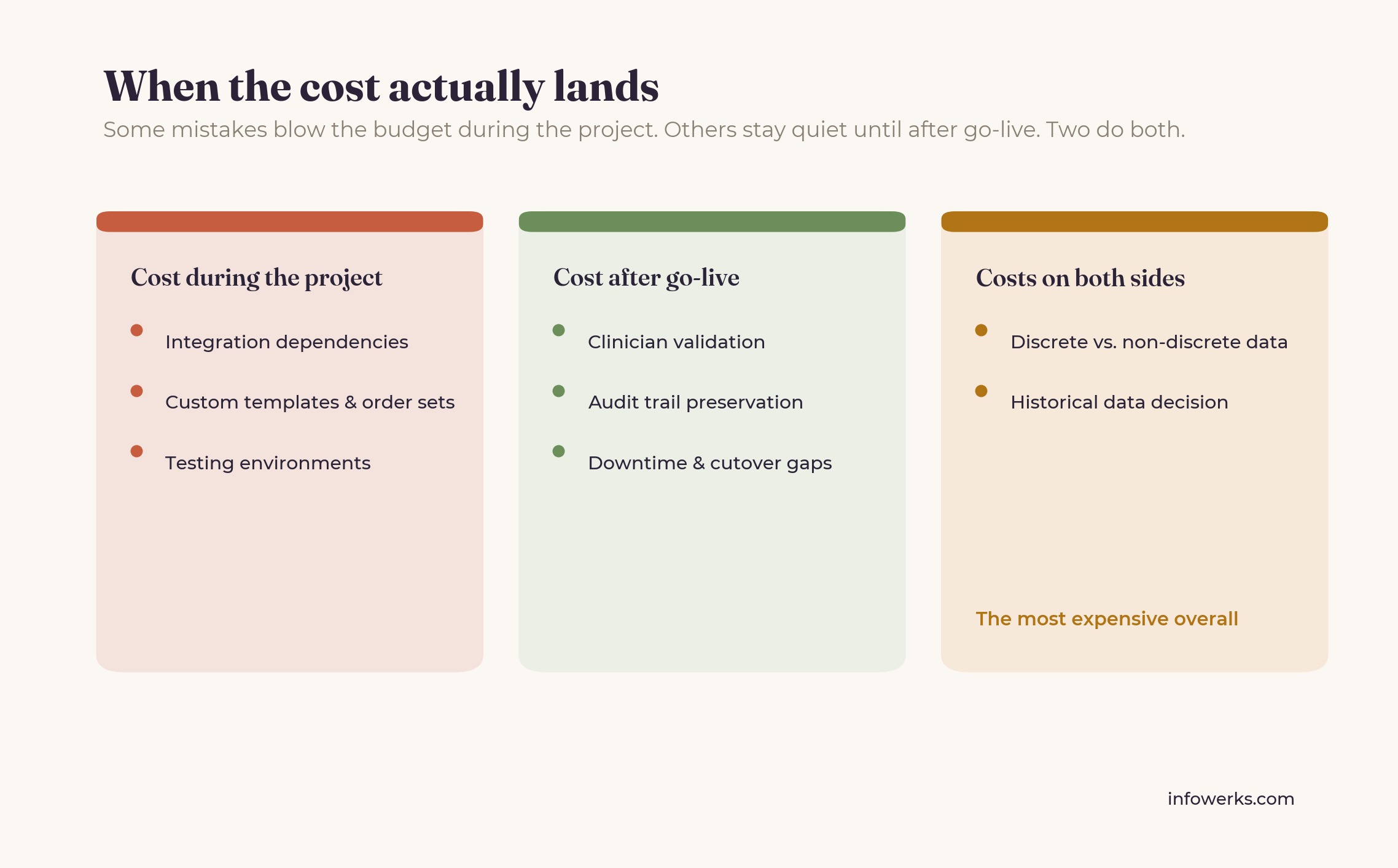
The integration and custom build mistakes usually produce the biggest cost overruns during the project itself. Clinician validation and audit trail failures usually produce the biggest costs after go-live. The discrete versus non-discrete problem is often the most expensive overall, because it drives up cost on both sides at once. There's a fuller breakdown in the true cost of a failed EHR migration.
How does Infowerks help organizations avoid these mistakes?
Infowerks focuses on the strategic assessment and discovery work, which is where most of these problems actually originate. In practice, that means detailed integration audits, an explicit migrate-archive-retire decision for each data category, separate handling for discrete and non-discrete conversion, and clinician workflow validation scheduled alongside the test migration instead of squeezed in at the end. The aim is to raise the difficult questions while there's still room to answer them properly.
What These Mistakes Have in Common
Looking back over the eight, the shared thread is that each one is a decision made early, often by people who haven’t run an enterprise migration before, that narrows the available options later on. Six months into execution, correcting a planning-phase mistake costs several times what it would have cost to get right at the start.
None of them is a failure of technical execution. The engineering work is usually done well. They’re failures of scoping, sequencing, and operational judgment, and the technical team spends the rest of the project compensating for them. The organizations that come through a migration in good shape are generally the ones that treated the planning phase as the most demanding part of the work, rather than a preliminary step before the real work started.
Looking for an EHR Data Migration Partner?
Infowerks works with healthcare organizations on enterprise EHR data migration, with a focus on catching the mistakes in this article before they reach the budget or the schedule. Most of that work happens early, in strategic assessment and discovery, where these problems are cheapest to address. If you’re scoping a migration and want to talk through the risks specific to your environment, contact Infowerks to discuss your project.
This article was written by Shristi Patni and reviewed by Jeff Deitch, CEO and Co-Founder of Infowerks Data Services, with nearly 35 years of experience in healthcare data interoperability.